The principal datastore you pick for a VCF cluster on Fibre Channel or NFS stays special for the life of that cluster, and SDDC Manager will remind you of that the moment you try to get rid of it.
With vSAN you hardly think about it: the vSAN datastore is the principal datastore and that’s it. However, since VCF 9 opened the door properly to external principal storage, I see more and more clusters running on VMFS over Fibre Channel or on NFS. As a result, arrays get replaced, LUNs get migrated, and sooner or later someone wants to clean up that very first datastore.
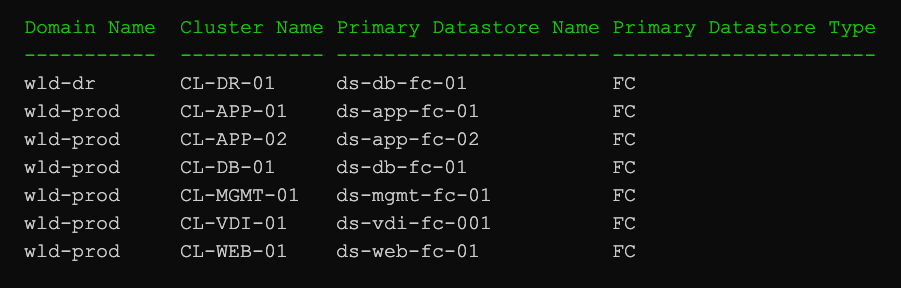
This post shows why that datastore matters, what you can do about it in VCF 9.0 and 9.1, and a small PowerShell script to see which datastore SDDC Manager considers primary for every cluster.
What the principal datastore actually is
SDDC Manager keeps track of one datastore per cluster as the primary datastore. It stores the name, the type (VSAN, VMFS_FC, NFS, …) and the vCenter MoRef of that datastore in its own inventory. You can add as many supplemental datastores as you like afterwards, but SDDC Manager keeps pointing at that one primary datastore.
However, it is not just a label, because SDDC Manager validates it during workflows. For example, adding a host to a cluster runs a “Validate cluster primary datastore” check, and if SDDC Manager can no longer find a valid primary datastore, the host addition fails (see KB 444862 for VCF 9.0 and KB 392768 for 5.x).
You can delete it, but SDDC Manager won’t like it
With FC or NFS, the principal datastore is just a LUN or an export that you selected at deploy time. Storage teams like to clean up, migrate arrays and retire old volumes. So sooner or later someone asks: “Can we remove that first datastore? Everything is on the new one now.”
Technically, yes. Nothing stops you from unmounting and deleting that FC LUN in vCenter. But SDDC Manager still references it as the primary datastore of the cluster, so its inventory is now out of sync. From that moment Day-N operations such as adding hosts start to fail. Therefore, first move the primary role, and only then clean up.
VCF 9.0: changing the principal datastore needs a KB
In VCF 9.0 there is no button and no supported public API to change the primary datastore. The 9.0 ClusterUpdateSpec in the SDDC Manager API simply has no field for it.
What you do have is Broadcom KB 452458, “Change the Primary Datastore of a Cluster in SDDC Manager”. In short:
- Look up the MoRef ID of the new VMFS datastore in the vCenter MOB.
- Export the domain details from the SDDC Manager inventory to a JSON file.
- Change the primary datastore ID, type and name in that file.
- PUT the updated JSON back to the internal inventory endpoint.
It works, but you are editing the SDDC Manager inventory directly. For that reason, take a snapshot of SDDC Manager first, and if you are not comfortable with it, open a case with Broadcom support.
VCF 9.1: a supported way to change the principal datastore
Fortunately, in VCF 9.1 this becomes a supported Day-N operation. The SDDC Manager 9.1 API has a clusterPrimaryDatastoreUpdateSpec (with a single datastoreId field) as part of the cluster PATCH call, and there is a datastore selection wizard in the SDDC Manager UI to update the primary datastore.
For management domains, KB 435850 lists the supported principal storage migration paths in 9.1:
- NFSv3 to NFSv3: supported
- VMFS on FC to VMFS on FC: supported
- vVols to vSAN: supported
- NFSv3 to VMFS on FC: not supported. If you want FC as principal storage, you have to choose it at deployment.
Two known issues in 9.1 to keep in mind:
- KB 443865: the wizard can show “Datastores not available” when the first datastore that vCenter returns is a local (non-FC) one. This is fixed in 9.1.1.
- KB 454193: in large VMFS environments the datastore selection wizard can time out. The workaround is to call the PATCH API with
clusterPrimaryDatastoreUpdateSpecdirectly.
In short, if you are on 9.1, go to 9.1.1 before you start moving primary datastores around.
If you prefer the API, the call looks roughly like this. Check the ClusterPrimaryDatastoreUpdateSpec reference for the exact format of datastoreId before you run it:
PATCH https://<sddc-manager>/v1/clusters/<cluster-id>
{
  "clusterPrimaryDatastoreUpdateSpec": {
    "datastoreId": "<new primary datastore>"
  }
}
9.0 vs 9.1 at a glance
| VCF 9.0 | VCF 9.1 | |
|---|---|---|
| Change primary datastore in the UI | No | Yes (use 9.1.1) |
| Change it with the public API | No | Yes, clusterPrimaryDatastoreUpdateSpec |
| Supported route | KB 452458 (inventory edit) | Day-N workflow |
| NFS to FC | No | No |
Check the principal datastore of every cluster
Before any storage cleanup, I first want to know which datastore SDDC Manager considers primary for every cluster. The /v1/clusters API returns primaryDatastoreName and primaryDatastoreType, so a few lines of PowerShell give you a nice overview.
Lab use only. This script skips TLS certificate validation and has the password hardcoded in the file. That is fine in my lab, but don’t run it like this in production. Use a trusted certificate (or at least remove the bypass) and ask for the credentials at runtime, for example with
Get-Credential.
# -------------------------------------------------------------------------
# VCF 9.x: Query Primary Datastores per Cluster via SDDC Manager API
# LAB USE ONLY: skips certificate checks and uses a hardcoded password
# -------------------------------------------------------------------------

$sddcManagerFqdn = "sddc-manager.yourdomain.local"
$adminUser       = "administrator@vsphere.local"
$adminPassword   = "YourPasswordHere"

# 1. Bypass SSL/TLS Certificate Validation
# For Windows PowerShell 5.1:
[System.Net.ServicePointManager]::ServerCertificateValidationCallback = { $true }
[System.Net.ServicePointManager]::SecurityProtocol = [System.Net.SecurityProtocolType]::Tls12

# 2. Build Authentication Payload
$authBody = @{
    username = $adminUser
    password = $adminPassword
} | ConvertTo-Json

$tokenUri = "https://$sddcManagerFqdn/v1/tokens"

# 3. Acquire Token (Add -SkipCertificateCheck if using PowerShell 7+)
$requestParams = @{
    Uri         = $tokenUri
    Method      = "Post"
    Body        = $authBody
    ContentType = "application/json"
}

# Add -SkipCertificateCheck automatically if running PowerShell Core / 7+
if ($PSVersionTable.PSEdition -eq "Core") {
    $requestParams["SkipCertificateCheck"] = $true
}

$authResponse = Invoke-RestMethod @requestParams
$token = $authResponse.accessToken

# 4. Query Clusters API
$clustersUri = "https://$sddcManagerFqdn/v1/clusters"
$clusterParams = @{
    Uri     = $clustersUri
    Method  = "Get"
    Headers = @{
        "Authorization" = "Bearer $token"
        "Content-Type"  = "application/json"
    }
}

if ($PSVersionTable.PSEdition -eq "Core") {
    $clusterParams["SkipCertificateCheck"] = $true
}

$clusterData = Invoke-RestMethod @clusterParams

# 5. Format and Output Primary Principal Datastore Details
$results = $clusterData.elements | ForEach-Object {
    [PSCustomObject]@{
        "Cluster Name"           = $_.name
        "Primary Datastore Name" = $_.primaryDatastoreName
        "Primary Datastore Type" = $_.primaryDatastoreType
        "Domain ID"              = $_.domain.id
    }
}

$results | Format-Table -AutoSize
You can also grab a cleaner version from my GitHub: Get-VCFPrimaryDatastore. That one asks for the credentials with Get-Credential and only skips the certificate check when you add -SkipCertificateCheck:
.\Get-VCFPrimaryDatastore.ps1 -SddcManagerFqdn sddc-manager.yourdomain.localThe GitHub version also looks up the workload domain names through /v1/domains, because /v1/clusters only gives you the domain ID. The output is one line per cluster, sorted by workload domain. Run it before you hand a list of “old” LUNs or exports to your storage team.
The safe order to retire an old principal LUN or export
- Run the script above and write down the primary datastore of every cluster.
- Present the new LUN or export to all hosts in the cluster.
- Move the primary role: KB 452458 on 9.0, the SDDC Manager wizard or API on 9.1.1.
- Run the script again and check that SDDC Manager now shows the new datastore.
- Storage vMotion the remaining VMs off the old datastore.
- Only now unmount and delete the old LUN or export.
Wrap-up
- With vSAN you rarely think about it, but with FC and NFS the principal datastore is a real dependency in SDDC Manager.
- Don’t delete or unmount it before you have moved the primary role.
- On 9.0 that means KB 452458. On 9.1 there is a supported UI and API, and 9.1.1 fixes the main wizard bug.
- Know what your clusters use today. The script above gives you that in a few seconds.
Looking for more? You can find my other VCF posts here, for example how I fixed LLDP neighbours on the X710 uplinks of my VCF hosts in this post.
References
- KB 452458: Change the Primary Datastore of a Cluster in SDDC Manager: https://knowledge.broadcom.com/external/article/452458
- KB 444862: “Validate cluster primary datastore” check failed during host addition: https://knowledge.broadcom.com/external/article/444862
- KB 435850: Supported Principal Storage Migration Paths for Management Domains in VCF 9.1: https://knowledge.broadcom.com/external/article/435850
- KB 443865: “Datastores not available” while trying to update primary datastore in VCF 9.1: https://knowledge.broadcom.com/external/article/443865
- KB 454193: Datastore selection wizard for updating the primary datastore times out: https://knowledge.broadcom.com/external/article/454193
- SDDC Manager API 9.1.1, ClusterPrimaryDatastoreUpdateSpec: https://developer.broadcom.com/xapis/sddc-manager-api/9.1.1/data-structures/ClusterPrimaryDatastoreUpdateSpec/